

Why underwater video is technically challenging
Above water and in perfect water conditions, 4K videos have an advantage over Full HD. However, in most underwater drone use cases, you won't see much difference due to the limitation of water clarity and poor light conditions often found underwater.
What really matters when water clarity is bad, is low-light sensitivity. Using a drone's built-in light during these conditions will often make matters worse as the light is reflected by particles, causing what is known as "backscatter", effectively blinding you and making it hard to navigate. Navigating using natural light during such conditions will significantly improve your ability to see where you are going. In extreme low light conditions with bad visibility, the Blueye external lights mounted in an angled orientation further away from the camera will reduce backscatter and thereby improve visibility.
What causes latency in underwater drone cameras
Live video latency is the delay between light reaching the camera sensor and the corresponding frame appearing on the operator's screen. In an underwater ROV, that video has to travel through several stages — and each one adds milliseconds:
- Capture and encoding. The image sensor reads out each frame and the onboard video processor compresses it, typically with H.264. Real-time encoders are a trade-off between quality and delay: long reference chains and B-frames improve compression but force the encoder to wait for future frames, increasing latency. Low-latency profiles avoid this at a small cost to bitrate efficiency.
- Transmission through the tether. Radio signals don't travel well through water, so ROVs communicate over a thin tether. The encoded stream is packetised and pushed through the tether at a bounded bitrate. Higher bitrates give sharper video but more bits to move per frame, and any retransmission on packet loss shows up directly as added delay.
- Surface-side buffering and decoding. On the top-side unit or host device, incoming packets are reassembled, a jitter buffer smooths out network variation, and the decoder reconstructs the frame. Large jitter buffers make the stream look smoother but add fixed delay; a tight buffer keeps latency low but is less forgiving of a noisy link.
- Display pipeline. Even after decoding, the frame still passes through the operating system's compositor and the display's refresh cycle before the operator sees it. On mobile devices this alone can add 30–100 ms.
End-to-end latency is the sum of all of these. An underwater ROV system that wants to feel "live" has to be engineered across the whole chain, not just the camera.
When comparing the specifications of different underwater drones, it seems to be easy to understand which one is the best on paper. Unfortunately, not all of these specifications reflect reality. Keep in mind the camera is also the operator's eye below the surface while navigating the drone. 4K recordings won't help if the operator can't see where he is going or the live feed delay is too high. This latency can make the drone harder to operate, possibly leading to dangerous situations.
How low-latency systems improve ROV operations
The Full HD low-latency live video stream makes the Blueye underwater drone responsive and easy to operate
We have prioritized to provide the operator with the highest quality and lowest latency live video feed. The cameras output a high-quality video stream of up to 16Mb/s in 1080p with less than 200ms latency, making the drone responsive and easy to operate. We have seen over the years that most of our customers make critical decisions during the dive, based on what they see live.

We chose Full HD as a good middle ground, by providing the end-user with high-quality video while maintaining the file sizes reasonably small. This results in fast file transfers and quick report generation. If a specific job requires higher resolution pictures or videos, we still have mounting options for external cameras.
| Pioneer | Pro | X1 | X3 | |
|---|---|---|---|---|
| Live video latency* | <200ms | <200ms | <200ms | <200ms |
| Live video quality | 1080p, 1-16Mb/s | 1080p, 1-16Mb/s | 1080p, 1-16Mb/s | 1080p, 1-16Mb/s |
| Recording format | 1080p 30fps MP4 | 1080p 30fps MP4 | 1080p 30fps MP4 | 1080p 30fps MP4 |
| Support for video overlay | ||||
| Manual camera controls | ||||
| Camera tilt | -10° | -30° to +30° | -30° to +30° | -30° to +30° |
| Low-light sensitivity | Good | Good | Excellent | Excellent |
| Sensor size | 1/3" | 1/3" | 1/2.8" | 1/2.8" |
Camera technology in professional underwater ROVs
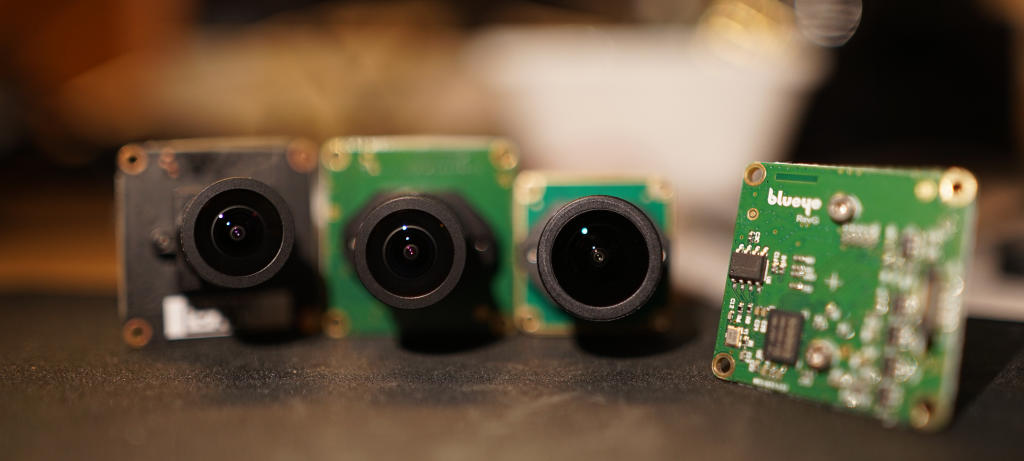
Our current X1 and X3 models share the same camera system: a new design with a larger image sensor that delivers excellent low-light performance, paired with a sharper lens. In addition to the built-in camera, the X3 can also mount an external camera, so you can see from additional angles.
All Blueye underwater drones are custom-made for Blueye and manufactured in Europe. The earlier Pioneer and Pro models are no longer offered to new customers but remain fully supported — they used smaller image sensors, and the Pro added a dome port and a tilt mechanism for the camera.
Fully-customizable camera settings in the Blueye app
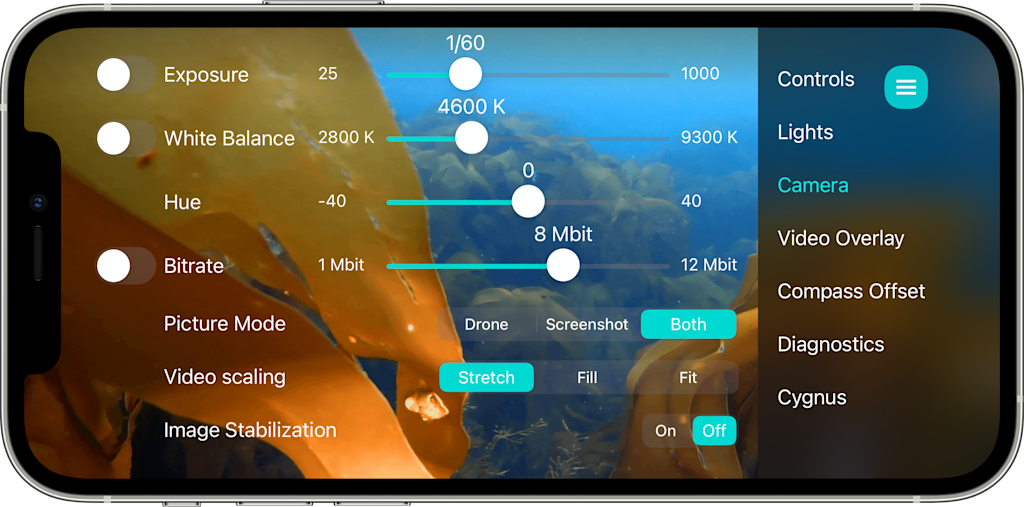
The app allows you to fully control the camera with manual exposure for fine-tuning the picture during difficult lighting conditions, shift the colors with the white balance and hue sliders, and adjust the bitrate when maximum quality is needed. Video scaling lets you choose between different aspects ratios in case you need a maximum field of view or want an undistorted image on your screen. Image stabilization helps you keep the camera straight while diving with a tight tether or during underwater currents.
Efficient and compatible files
Our videos are recorded and streamed using H.264 encoding, as it's an efficient and well-established industry standard. The video files are saved as .mp4 and are compatible with common video editors across most devices and operating systems. The live video feed is sent using the RTSP video transfer protocol, making it easy to integrate with third-party applications or to combine it with our SDK. Pictures are recorded as JPEG, including key sensor data and text notes as EXIF metadata. This makes it possible to generate data overlays while downloading the pictures in the app.
Data overlay on the underwater drone camera footage
For an easier review of the videos, you can enable data-overlay to your videos while recording. Comments can be added during the dive for both video and image overlay. You can further customize the overlay with your own logo.

Conclusion
Underwater drone cameras are different from normal cameras. While above water resolution is an important factor for picture quality, while for an underwater drone light sensitivity and a low latency videostream is more important. The added benefit of higher resolution is often negated by the water clarity. High-quality Full HD videos are a good middle ground between perceived quality and reasonable file size that ensures a smooth workflow for the operator. With our automatic dive report generation and data overlays on both videos and pictures, we make it easy to document your findings. Blueye's high-quality and low-latency video stream ensures safe and efficient inspections.
Please have a look at our YouTube channel to review the video footage from our drones. You can also book a live demo here to see how well the drone works.


